Introduction
A single punch in Guilty Gear Strive or Street Fighter 6 can take a trained animator dozens of attempts to get right. It looks instant. It isn't.
Fighting game animation is one of the most technically demanding disciplines in the industry. Every frame has to satisfy two masters at once: it must look powerful, and it must play fair.
A combo that reads well in a video clip can still feel broken in the hands of a competitive player if the timing is off by a few frames.
Quality here doesn't come from raw drawing talent alone. It comes from reference research, animation principles, the right tools, and a workflow that treats gameplay data as seriously as visual polish.
This guide walks through what separates professional fighting game animation from amateur work:
- The exact production pipeline professional studios use
- The principles that separate stiff motion from combat that feels genuinely powerful
- The software suited to different animation pipelines
- The mistakes that trip up most beginners
Key Takeaways
- Fighting game animation follows a defined pipeline: reference, rig, pose, timing, VFX, then in-engine testing
- Anticipation, squash/stretch, and hit-frame timing decide whether a hit feels weighty or weightless
- Software choice depends on pipeline: Maya/Blender for 3D, Spine/Adobe Animate for 2D, Aseprite for pixel art
- Most beginner mistakes stem from skipped reference work or ignored timing, not weak drawing skills
- Frame counts vary by title, from a few hundred to over a thousand per character
Step-by-Step Guide: How to Animate a Fighting Game Character
This is the core production pipeline professional animators use, moving from concept sketch to in-engine polish. Skipping steps here is where most amateur combo animations fall apart.
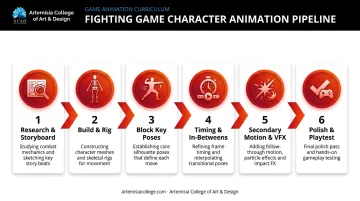
Step 1: Research References and Storyboard the Move
Before sketching a single pose, study real martial arts footage, existing fighting game combos, and anime or film references that match your character's style.
- Define the character's fighting style and full move list before designing any poses
- Build a curated reference library: fighting clips, martial arts footage, fight choreography
- Storyboard the beat of the move on paper or in storyboard software first
Arc System Works' team behind BlazBlue began every character this way, starting from hand-drawn concept sketches before any 3D modelling touched the process.
Step 2: Build and Rig the Character
For 3D pipelines, sculpt or model the character, then rig it with a skeleton built for kinematics.
- The rig must survive exaggerated poses without breaking joints or clipping geometry
- Weapon and accessory attachments need their own bone chains or constraints
- Common tools: Maya, Blender, or 3ds Max
For context on how far rigging can go, Arc System Works' Guilty Gear Xrd presentation documented rigs averaging around 500 bones per character, built specifically so 3D models could be posed frame-by-frame like hand-drawn art.
Step 3: Block Key Poses for Anticipation, Impact, and Recovery
This is where the move actually gets designed. Block the anticipation pose, the strike pose, and the follow-through pose first, before touching any in-betweens.
- Check readability at a low frame count. If the pose isn't clear at three frames, it won't be clear at thirty
- Use pose libraries (Studio Library is a common choice) to reuse and adapt poses across a move list
- Exaggerate each pose beyond natural anatomy limits, since subtlety disappears at full combat speed
The same Xrd team disabled interpolation entirely and treated every displayed frame as a deliberately posed keyframe, closer to stop-motion than smooth 3D animation. That decision reflected a specific insight: smoother didn't mean better. It made the model look more 3D, which fought against the 2D aesthetic they wanted.
Step 4: Add In-Betweens, Timing, and Hit Stops
Now fill the spacing between key poses based on the weight and speed you want the attack to carry.
- Faster attacks use fewer in-between frames; heavier attacks use more, with held frames at the extremes
- Hit-stop frames need to align with hit and hurt frame data, not just look good in isolation
- Ease into heavy attacks with tighter spacing near the impact frame to sell weight and force
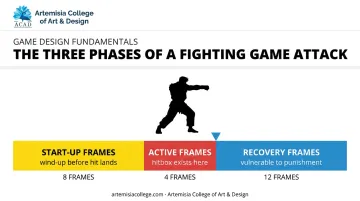
Capcom's own Street Fighter 6 frame data publishes exact start-up and active windows for every move, confirming that a hitbox only exists during specific active frames. Your visual timing has to respect that data, or the move will feel disconnected from what the game engine is actually doing.
Step 5: Layer Secondary Motion and VFX
Add cloth, hair, or scarf secondary animation, plus impact effects like sparks, speed lines, and screen shake.
- FX timing must land exactly on hit stops, not before or after
- Never let particle effects obscure the character's silhouette mid-attack
- Common tools: After Effects, Unity's Particle System, or purchased 2D FX packs
Step 6: Polish, Playtest, and Iterate In-Engine
Export the final animation and test it inside the actual game engine, not in a standalone viewer.
- Animation must feel responsive under real player input, with real latency
- Loop in playtester feedback before locking anything as final
- Re-check the finished move against your original reference footage before marking it complete
Arc System Works validated this exact way for Guilty Gear Strive, coordinating 2D art, modelling, animation, effects, and programming teams around a real-time engine preview rather than isolated animation clips.
Core Animation Principles That Make Fights Feel Powerful
These principles, adapted from classic animation fundamentals, decide whether a combo looks stiff or genuinely lands with force.
Anticipation, Action, and Reaction
Anticipation gives players a visual cue to read before an attack connects. Skip it, and hits feel cheap or unreadable. Overdo it, and the move feels like it's fighting the controls.
Game Developer's animation guidance flags this exact trade-off: anticipation on a player character can register as input lag if it's held too long. Telegraph the attack, but don't delay the response the controls promised.
Squash, Stretch, and Exaggeration
Squash and stretch sell the force behind a punch and the recoil of impact. BlazBlue's sprite work leaned on this constantly, enlarging fists on contact and elongating limbs on kicks to communicate power and speed within a single frame. Exaggeration takes this further: stretching a hit frame beyond anatomical accuracy makes the impact read instantly, even at 60fps.
Without deformation, hits feel weightless regardless of model quality. But there's a catch: extreme squash can push the artwork out of sync with the actual hit and hurt volumes underneath, so check deformed frames against collision data before locking them in.
Timing, Spacing, and Hit/Hurt Frames
Timing defines whether a move feels fast, heavy, or fair. Poor timing breaks combo flow and frustrates skilled players faster than any visual flaw.
- Start-up frames set how long a player waits before the hit lands
- Active frames define the window where the hitbox actually exists
- Recovery frames determine how punishable a whiffed attack is
Weight, Physics, and Overlapping Action
Body parts should move at different rates, with heavier limbs settling last. A heavyweight grappler's follow-through should drag longer than a lightweight rushdown character's snap-back. Research how your specific character's mass should behave before keyframing recovery poses.
Clarity of Motion and Silhouette
Players need to instantly read an attack, even mid-exchange at high speed. Game Developer's guidance on this is blunt: a key pose should stay identifiable as a black silhouette, no internal detail required. Cluttered VFX or muddy poses hurt readability and, by extension, competitive playability.
Tools, Software, and Skills You Need Before You Start
The right toolset shapes how efficient and polished the final animation turns out. Different visual styles call for genuinely different pipelines.
Software by Animation Style
| Pipeline | Common Tools | Best For |
|---|---|---|
| 3D | Maya, Blender, 3ds Max | Rigging, keyframing, dense skeletal control |
| 2D skeletal | Spine, Adobe Animate, Toon Boom | Mesh-skinned characters, reusable animation |
| Pixel/isometric | Aseprite, GraphicsGale + Unity/Unreal | Frame-by-frame sprite work, retro fighters |
Each tool serves a distinct pipeline rather than competing head-to-head. Spine, for instance, handles mesh skinning and dopesheet timing well for 2D skeletal rigs, while Aseprite is built around a frame-and-layer workflow suited to hand-drawn sprite fighters.
Core Skills to Build
Software alone won't get you there. Structured programs, like Artemisia College's Animation & VFX curriculum, pair these tools with hands-on training in the following areas:
- Anatomy and kinetics knowledge to animate believable strikes and reactions
- Familiarity with martial arts and combat styles for authentic move variety, not generic swings
- Rigging fundamentals to build skeletons that survive exaggerated poses
- Storyboarding basics to plan a move before animating it frame-by-frame
- Comfort in a game engine (Unity or Unreal) to test animation under real input conditions
Common Mistakes to Avoid When Animating Fighting Games
Most beginner errors come from skipping steps, not from a lack of drawing ability.
- Skipping reference research. Jumping straight into keyframing without studying real combat footage produces generic, unconvincing movement.
- Ignoring hit-stop and timing. Combos that don't respect hit/hurt frame data feel disconnected and unresponsive, no matter how clean the art looks.
- Overloading VFX. Sparks and trails that bury the character's silhouette actively hurt readability during fast exchanges.
- Polishing too early. Refining details before the key poses and weight are locked wastes hours reworking finished art.
Fix the order, not just the individual mistakes: reference first, poses second, timing third, polish last.
Turning This Skill Into an Industry Career
Fighting, action-adventure, and mobile game studios specifically look for animators trained in combat timing and rigging, not just general animation ability. That distinction matters during hiring, because a generalist portfolio rarely demonstrates the frame-precise control combat animation demands.
Structured, mentor-led training changes that trajectory. At Artemisia College of Art & Design, students in the Animation, VFX & Game Design programs work through this exact pipeline, from rigging through to in-engine testing, using industry-aligned tools including Unity and Unreal Engine.
A few things worth knowing about how that structure works in practice:
- Artemisia holds Gold Level Unreal Academic Partner status, reportedly the only college in India with this accreditation from Epic Games, giving students direct workshops and early tool access
- Students gain access to ACAD Studios, the college's in-house production studio, from their second year onward, working as paid interns on live animation and game projects
- Faculty in the Game Design department include working professionals such as a certified Unreal Authorized Instructor and a senior Unity/Unreal developer, bringing studio-level critique into the classroom
- The college maintains a dedicated Placement Cell that handles portfolio finalization, mock interviews, and coordination with 100+ partner studios, including Rockstar Games, Ubisoft, Krafton, and Electronic Arts
Self-teaching combat animation is entirely possible with enough patience and reference material. But structured mentorship changes the timeline. Daily feedback on weight and timing errors, paired with access to a real production pipeline, moves beginners from understanding the principles to shipping animation in a real game considerably faster than working alone.
About Artemisia College of Art & Design
Combat animation rewards animators who understand weight and timing before they open a piece of software. Artemisia College of Art & Design was set up under Tryambakam Education Foundation to make high quality art and design education affordable without thinning it out. Roughly 90% of the teaching staff come from working industry, bringing between five and thirty-five years of practice into the studio. The college runs ACAD Studios, its own animation and game production house, and students join it as paid interns from their fourth semester onward.
Animation runs at three levels: the Certificate in 2D & 3D Animation, the Diploma in 3D Animation & VFX and the four-year B.Design in Animation. Alongside it the college awards B.Design degrees in Game Design, Interior Design and Fashion Design, BFA and MFA routes in Painting and Sculpture, and a Certificate in Photography.
Fees are deliberately low so cost is not what decides whether a creative student can study, and scholarships are available. Have a look at the fee structure, or go through early admission if a portfolio suits you better than an entrance test.
Frequently Asked Questions
What is the best software to animate a fighting game?
It depends on your pipeline. Use Maya or Blender for 3D characters, Spine or Adobe Animate for 2D skeletal rigs, and Aseprite for pixel-art fighters.
How many animation frames does a fighting game character typically need?
It varies enormously by title. Siliconera's reporting on BlazBlue's production noted roughly 1,000 hand-drawn frames per character, while Skullgirls holds a Guinness World Record for over 1,400 frames per fighter.
How long does it take to animate a fighting game character?
There's no universal figure. A single combo can take dozens of hours to block, time, and polish, while a full roster realistically spans months of production across a team.
Is 2D or 3D better for fighting game animation?
Neither is definitively better. It depends on the desired aesthetic and pipeline; 3D-to-2D hybrids like Guilty Gear Xrd exist precisely because studios wanted 3D efficiency with a 2D look.
What skills do I need to become a fighting game animator?
You need anatomy knowledge, a solid grasp of animation principles, rigging fundamentals, and genuine familiarity with combat references and martial arts movement.
Can I learn fighting game animation without a formal degree?
Self-teaching is possible, but structured, mentor-led programs like those at Artemisia College pair studio-aligned pipelines with direct feedback and placement support, accelerating skill-building and job-readiness considerably faster.