Introduction
Remember the first time you saw a building collapse in slow motion in a Rockstar Games cutscene, or watched a Marvel superhero tear through steel like paper? That moment probably made you wonder: how is this even made?
Most beginners assume VFX demands a Hollywood studio, a top-tier gaming rig, and a film school degree before you can touch a single tool. That assumption is wrong.
You can learn the fundamentals of visual effects using free software, free tutorials, and a laptop you already own. This guide covers the core concepts and the best free tools, then walks you through a practical, step-by-step path to creating your first VFX shot at home.
Key Takeaways
- Blender and DaVinci Resolve/Fusion teach real 2D and 3D VFX workflows for free
- Keyframes, compositing, rotoscoping, motion tracking, and rendering form the five core beginner skills
- Self-taught learning builds curiosity, but mentorship closes skill gaps faster
- Small, focused projects teach more than a Hollywood-scale shot on day one
What is VFX and Why Should Beginners Learn It?
VFX, short for visual effects, refers to imagery that's altered, created, or enhanced for live-action footage when it can't be captured during filming. Autodesk defines it as exactly that: effects added after the camera stops rolling, in post-production, not on set.
That's the key difference beginners often miss: VFX blends computer-generated elements into real footage so convincingly that audiences never question it, without requiring artists to build an entire digital world from scratch.
Why learn it now? The industry is shifting, and India is part of that shift. According to a 2025 FICCI-EY report, India's combined animation, VFX, and post-production segment reached ₹103 billion in 2024.
The segment saw a temporary dip that year, but the underlying demand for skilled artists across films, games, and streaming content remains strong.
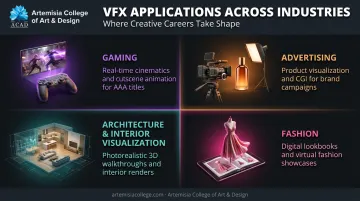
VFX skills also extend well beyond feature films:
- Gaming – cinematic cutscenes, in-game particle effects, environment integration
- Advertising – product shots that would be impossible or expensive to film live
- Architecture and interior visualization – photorealistic renders for client pitches
- Fashion – digital lookbooks and virtual try-on content
These cross-industry demands mean employers value VFX skills well beyond traditional film studios, from game development houses to advertising agencies.
Essential VFX Concepts Every Beginner Must Master
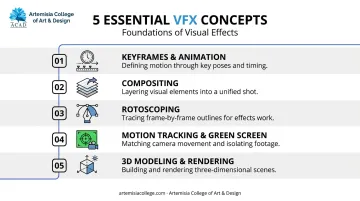
Before touching any software, you need to understand five concepts. These show up in almost every VFX shot ever made, from a low-budget YouTube short to a Marvel blockbuster.
Keyframes and Animation Basics
A keyframe marks a specific value of a property (position, scale, opacity) at a specific point in time. Software fills in the gaps between keyframes automatically, a process called interpolation.
Say you're animating a ball moving across the frame. Set a keyframe for its starting position, another for its ending position, and the software calculates every frame in between. Adobe's guide to keyframe interpolation breaks down three approaches:
- Linear – constant speed, but can look robotic
- Bezier – full manual control over the motion curve
- Ease in/out – gradual acceleration and deceleration for natural movement
Master keyframes first. Everything else in VFX builds on this idea of controlling change over time.
Compositing
Compositing is the art of combining CG images, live-action footage, and painted elements into one believable shot. Think of it as digital layering, similar to stacking transparent sheets on top of each other.
This involves:
- Layering – stacking multiple visual elements in the correct order
- Masking – hiding or revealing parts of a layer selectively
- Colour grading – matching the tone and lighting of all elements so they feel shot in the same environment
Software like Adobe After Effects and Foundry Nuke use node-based or layer-based systems to handle this. Fusion, built into DaVinci Resolve, works similarly with connected nodes for both 2D and 3D merges.
Rotoscoping
Rotoscoping isolates a subject, usually an actor, frame by frame so it can be separated from its background. Manual rotoscoping means literally drawing or painting around the subject on individual frames.
That's slow. Tools like Mocha speed this up using AI-assisted tracking that generates animated mattes from a single drawn shape, cutting down hours of manual work. Roto is essential whenever you need to place an actor inside a CGI environment without a green screen.
Motion Tracking and Green Screen (Chroma Key)
Motion tracking analyzes how an object moves frame-by-frame in your footage, then saves that movement data so a digital element can "stick" to it. Point a tracker at a moving car, and a digital logo will move with the car automatically.
Green screen, or chroma keying, works differently: it removes a specific background colour (usually green or blue) and replaces it with something else entirely.
A beginner-friendly combo: shoot yourself against a green sheet, key out the background in DaVinci Resolve's Fusion tab, then drop in a new scene. That's the same principle behind weather forecasts and superhero flight scenes alike.
3D Modeling and Rendering Fundamentals
Once you move beyond 2D compositing, you'll bump into 3D basics:
- Modeling – building digital objects with depth and volume
- Texturing/materials – defining what an object is made of (metal, skin, fabric) and how light interacts with it
- Rendering – generating the final 2D image from your 3D scene
Blender's Cycles engine, for example, uses path-tracing to simulate realistic light bounces. You don't need to master 3D immediately, but knowing these terms prepares you for the next stage of learning.
Free Tools, Software, and Resources to Learn VFX at Home
You don't need a paid subscription to start. Here's where to begin.
Free VFX Software to Start With
| Tool | Best For | Notes |
|---|---|---|
| Blender | 3D modeling, tracking, and compositing | Fully free and open source; built-in compositor handles color grading and masking |
| DaVinci Resolve / Fusion | 2D and 3D shot compositing | Resolve is free; Fusion's node system handles tracking, keying, and roto shapes |
| Houdini Apprentice | Procedural 3D simulation | Free for learning and non-commercial work only; uses its own file format |
Blender is the strongest starting point since it covers tracking, 3D integration, and compositing in one free package, while Fusion is worth learning specifically for shot compositing. Houdini Apprentice makes sense once you're ready for simulations like fire, smoke, or destruction.
YouTube Channels and Free Video Tutorials
Official learning hubs are a reliable place to start since they're maintained and updated:
- Adobe's After Effects learning hub – structured tutorials on keyframes, keying, and animation basics
- Foundry's Learn Nuke series – a three-part beginner path covering footage import through basic compositing
- Boris FX's Mocha tutorials – planar tracking and tracked roto masks, ideal once you've grasped basic compositing
Search for specific technique names (like "chroma key tutorial Fusion") rather than relying on one creator. This gets you current, relevant results.
Free Online Courses and Learning Communities
- Foundry Community's beginner-focused threads walk through Nuke compositing basics
- Vendor documentation pages (Blender Manual, Blackmagic training pages) double as structured mini-courses
- Peer feedback groups, whether on forums or informal creator communities, help you catch mistakes you can't see yourself
Consistency matters more than the platform, so pick two or three sources and stick with them instead of jumping between a dozen channels.
Step-by-Step: Create Your First VFX Shot at Home
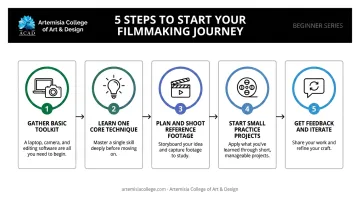
Step 1: Gather Your Basic Toolkit
Keep this minimal to avoid overwhelm:
- A laptop that can run your chosen software smoothly
- A smartphone or camera for shooting reference footage
- One software choice (Blender or Fusion) — resist the urge to install everything at once
Step 2: Learn and Apply One Core Technique
Pick a single technique, such as green screen keying or motion tracking, and practice it in isolation. Don't try to combine five techniques in your first project. Master one before layering on the next.
Step 3: Plan and Shoot Reference Footage
Before filming:
- Sketch your shot – know what element you're adding before you hit record
- Control your lighting – flat, even lighting makes keying and compositing far easier
- Lock your exposure – avoid automatic exposure shifts mid-shot, which create flickering during compositing
Step 4: Start With Small Practice Projects
Good starter projects:
- Adding a fire or smoke element to an existing clip
- Replacing a plain background with a new scene
- Duplicating an object to create a "clone" effect
Each of these teaches a specific skill without requiring a full production pipeline.
Step 5: Get Feedback and Iterate
Share your early work in VFX communities or with anyone experienced in the field. Fresh eyes catch things you'll miss, like a mismatched shadow or an edge that doesn't blend cleanly. Iteration, not perfection, is the goal at this stage. If you want feedback that goes beyond forum comments, mentor-driven programs like Artemisia College's Animation & VFX course pair students with industry professionals who review work at every stage, from first composite to final showreel.
Self-Taught vs a Structured VFX Course: Which Path Is Right for You?
Self-teaching has real advantages. It's flexible, low cost, and lets you explore at your own pace using tools like Blender and Resolve.
But it has limits too:
- No mentorship to catch bad habits early
- Gaps in fundamentals that only surface once you attempt harder shots
- No accountability to keep you moving forward when motivation dips
A structured program fills these gaps. It adds mentorship, access to industry-standard labs and software, and a clear progression from basic compositing to advanced VFX pipelines. ScreenSkills notes that a strong portfolio is essential for landing VFX roles, and structured environments give you the guided projects needed to build one properly.
Artemisia College's Animation & VFX program addresses exactly this gap, taking self-taught curiosity and turning it into an industry-ready skill set. The college's Placement Cell works with hiring partners across gaming and VFX, including studios like Rockstar Games, Electronic Arts, Ubisoft, and DNEG, and supports students through:
- Portfolio finalization
- Mock interview preparation
- One-on-one career mentoring
Program graduates have moved into VFX and animation roles at partner studios, turning structured training into real placement outcomes.
If you've already spent months experimenting with free tools and want to go further, this kind of structured next step is worth exploring.
About Artemisia College of Art & Design
Free tutorials will take you a surprising distance; structured training is what takes you the rest of the way. Artemisia College of Art & Design runs under Tryambakam Education Foundation, built around one idea: strong fundamentals make a designer, software familiarity makes a computer operator. Around 90% of its faculty come from the animation, game, interior and fashion industries. Students join ACAD Studios, the college's own production house, as paid interns from the fourth semester, so they graduate with credits on work that actually shipped.
Animation runs at three levels: the Certificate in 2D & 3D Animation, the Diploma in 3D Animation & VFX and the four-year B.Design in Animation. Alongside it the college awards B.Design degrees in Game Design, Interior Design and Fashion Design, BFA and MFA routes in Painting and Sculpture, and a Certificate in Photography.
The college keeps tuition low and offers scholarships to bright and needy students. The current fee structure is published online, and early admission lets you apply on a portfolio and interview instead of an entrance test.
Frequently Asked Questions
Can I learn VFX in 1 year?
Foundational skills like compositing, tracking, and basic 3D can be built in a year with consistent practice. Mastering advanced pipelines and photorealistic simulation typically takes longer.
What is the best way to learn VFX?
Start with free tutorials to grasp fundamentals, then move to a structured course or mentorship for faster, industry-relevant progress. Combining both paths works better than relying on either alone.
Is VFX easy or hard?
Basic concepts like keyframes and layering are approachable for beginners. Advanced work, such as fluid simulation or photorealistic compositing, requires sustained technical practice over time.
Do I need expensive software or a powerful computer to start learning VFX?
No. Free tools like Blender and DaVinci Resolve run on standard laptops and cover real compositing and tracking workflows, plus basic 3D work. You can build genuine skills before investing in anything paid.
Can I get a job in VFX without a formal degree?
A strong portfolio often carries more weight than a degree alone. That said, structured training improves industry access and mentorship quality, boosting placement outcomes.
What is the difference between VFX and animation?
VFX integrates computer-generated effects into live-action footage. Animation creates movement entirely within a digital environment, without live footage involved at all.