Introduction
The animation, VFX, and gaming industries are evolving fast in 2026, faster than most students can keep pace with. New rendering engines, real-time pipelines, and AI-assisted tools are reshaping what studios expect from fresh talent.
Pick the wrong software to learn, and you waste months building skills studios don't actually use. Pick the right one, and you build a portfolio that gets noticed.
That decision carries more weight as the industry keeps scaling. The global 3D animation market was valued at $22.67 billion in 2023 and is projected to grow at a 12.3% CAGR through 2030, according to Grand View Research. More growth means more studio jobs, but also tougher competition for candidates who know the right tools.
This guide breaks down the best animation and video software of 2026, how to choose based on your career goals, and how structured training turns software skills into an actual job offer.
Key Takeaways
- Animation software splits into five categories: 2D, 3D, motion graphics/VFX, real-time engines, and video editing
- Blender, Maya, Toon Boom Harmony, After Effects, Unreal Engine, and Premiere Pro/DaVinci Resolve top the 2026 lineup
- Free tools build fundamentals fast, but studios still expect fluency in industry-standard paid software
- Your career path, not popularity, should decide which program you learn first
- Mentor-led training closes the gap between "knowing software" and "getting hired"
Overview of Animation & Video Software in 2026
Animation and video software covers every tool used to design, rig, render, and edit moving images, from short cartoons to blockbuster VFX sequences. Fluency in these tools is now a baseline requirement for animation, VFX, and gaming careers.
India's own market data reflects a mixed picture. FICCI reported the country's animation and VFX growth slowing to 8.3% in 2023, partly due to a dip in global outsourcing work. Studios are becoming more selective, making software proficiency one of the clearest differentiators for job seekers.
Four categories define this space:
- 2D animation: frame-by-frame or rigged character animation for TV, film, and streaming
- 3D animation: modelling, rigging, and rendering for film, games, and advertising
- Motion graphics/VFX: compositing, visual effects, and title sequences
- Video editing: assembling, colour grading, and finalising footage
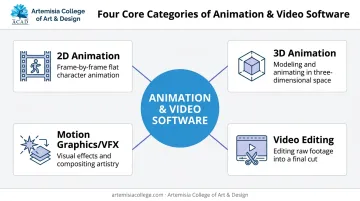
Here's how the top programs in each category stack up heading into 2026.
Top Animation & Video Software Programs in 2026
We picked these six programs based on four factors: adoption by real studios, learning curve for beginners, depth of professional features, and relevance to animation, VFX, and game design careers. Pricing below reflects official global list rates in USD, converted to INR only where region-specific pricing was confirmed (Maya).
Blender
Blender is a free, open-source 3D suite used by indie artists, VFX professionals, and game developers worldwide. It handles modelling, rigging, sculpting, rendering, and even basic video editing in one package, per Blender's official feature list.
What makes it stand out is simple: zero cost, an active global community, and capabilities that now rival paid software. The animated feature Flow was built entirely in Blender and rendered with EEVEE, proving it can carry a full theatrical production, according to 80 Level's breakdown of the film.
| Aspect | Details |
|---|---|
| Pricing | Completely free and open-source |
| Best For | Beginners to professionals in 3D modelling, VFX, and game assets |
| Key Features | Sculpting, rigging, Cycles/Eevee rendering, Python scripting |
Autodesk Maya
Maya remains the industry-standard 3D animation, modelling, and rendering software for major film and game studios. Character animation, simulation, and rendering pipelines at studios like Pixar and EA still run through it.
Studios build entire production pipelines around it, particularly for character rigging and animation work.
| Aspect | Details |
|---|---|
| Pricing | ₹16,520/month or ₹1,28,620/year (official India pricing) |
| Best For | Professional 3D animators, VFX artists, game character riggers |
| Key Features | NURBS/polygon modelling, Arnold renderer integration, motion capture support |
Toon Boom Harmony
Harmony is the professional-grade 2D animation software behind countless TV and film productions. Studios trust it for advanced rigging, automated lip-sync, and the flexibility to mix vector and bitmap artwork in one project.
| Aspect | Details |
|---|---|
| Pricing | Essentials $30/month, Advanced $77/month, Premium $139/month |
| Best For | 2D animators pursuing careers in TV, film, or streaming animation |
| Key Features | Rigging, compositing, Storyboard Pro integration, cut-out animation tools |
Adobe After Effects
After Effects is the go-to tool for motion graphics, VFX compositing, and 2D character rigging. Its Puppet tool and layer-based compositions make it a favourite for advertising, explainer videos, and title sequences.
Its seamless fit inside the Adobe ecosystem lets editors move footage between Premiere Pro and After Effects without friction.
| Aspect | Details |
|---|---|
| Pricing | From $22.99/month (first-year single-app Creative Cloud plan) |
| Best For | Motion graphics designers, VFX compositors, video editors |
| Key Features | Puppet tool rigging, keyframe animation, plugin ecosystem, compositing |
Unreal Engine
Unreal Engine is the real-time 3D engine powering game development, virtual production, and live VFX work. Studios use it for real-time rendering on set and for building interactive game design pipelines.
Its Blueprint visual scripting system lets artists build gameplay logic without writing code, while Nanite and Lumen technology handle film-quality lighting and detail in real time.
| Aspect | Details |
|---|---|
| Pricing | Free until $1M lifetime revenue, then a 5% royalty (per Unreal Engine's licensing terms) |
| Best For | Game designers, real-time VFX artists, virtual production teams |
| Key Features | Real-time rendering, Blueprint visual scripting, Nanite/Lumen technology |
Adobe Premiere Pro / DaVinci Resolve
These two platforms handle the final stage: assembling, colour grading, and finishing animated and live-action content. DaVinci Resolve offers a genuinely professional free version, while Premiere Pro integrates tightly with After Effects for animation-heavy edits.
| Aspect | Details |
|---|---|
| Pricing | DaVinci Resolve: free, or $295 for Studio; Premiere Pro: from $22.99/month |
| Best For | Video editors finalising animated sequences, colourists, post-production artists |
| Key Features | Multi-cam editing, colour grading, Fusion VFX (Resolve), Adobe ecosystem sync (Premiere) |
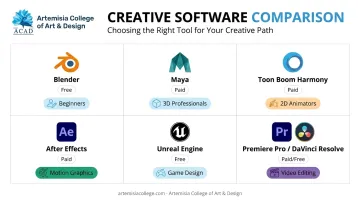
Software fluency matters most when paired with industry exposure. At Artemisia College, students train on Blender, Maya, and Unreal Engine inside pipelines modelled on hiring partners like Ubisoft and Electronic Arts, connecting tool mastery directly to placement readiness.
Free vs. Paid Animation Software: Which Should You Learn First?
Free tools like Blender and Krita are excellent for building foundational skills without financial risk. You can learn modelling, rigging, and basic compositing without spending a rupee.
Here's the catch, though: most animation, VFX, and game studios still expect proficiency in industry-standard paid software. A 2025 job digest from 80 Level listed working knowledge of packages like 3ds Max, Maya, or Blender as a common hiring requirement.
Even Rockstar Games' own listings call Maya and MotionBuilder experience "desirable," not mandatory, for animation tools roles. At Artemisia College, our curriculum pairs Blender fundamentals with Maya, 3ds Max, and Unreal Engine training to match what studios like Rockstar Games and Electronic Arts expect.
So the smart approach looks like this:
- Start free: learn fundamentals in Blender without financial pressure
- Test paid tools early: use student licenses or free trials of Maya, Toon Boom, or After Effects
- Match tools to your target studio: research what your dream employer actually uses before committing money
Treat free software as a stepping stone toward paid tools, especially once you're building a portfolio meant for studio recruiters.
How to Choose the Right Software for Your Creative Career Path
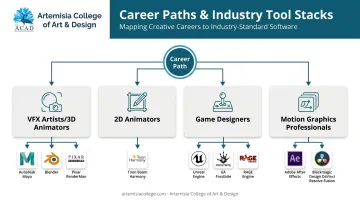
Your software choice should follow your career goal, not the other way around. A VFX artist, 2D animator, game designer, and motion graphics professional all need different tool stacks.
Here's what studios actually standardise on:
- VFX artists/3D animators: Maya for character work, Blender for full-pipeline flexibility, and Pixar's RenderMan for final-frame rendering on feature films
- 2D animators: Toon Boom Harmony, with the Premium tier adding node-based rigging and FX controls
- Game designers: Unreal Engine's Blueprint system for visual scripting, though major studios also run proprietary engines like EA's Frostbite and Rockstar's RAGE
- Motion graphics professionals: After Effects for compositing, DaVinci Resolve's Fusion page for node-based VFX work
Rockstar's own job listings reflect this range. An Animation Tools Programmer role calls Maya and MotionBuilder "desirable," while a Senior Technical Artist listing requires Houdini, ZBrush, or Agisoft/Metashape experience. The specific tools shift by role, even within the same studio.
Why Self-Taught Skills Often Fall Short
Knowing software isn't the same as being job-ready. Self-taught animators frequently hit a wall because they lack:
- Structured feedback on technique and pipeline habits
- Mentorship from people who've actually worked inside studios
- Portfolio guidance that matches what recruiters screen for
This is where structured training changes the trajectory. Artemisia College of Art & Design runs B.Des programmes in Animation & VFX and Game Design & Development, training students directly on industry-standard tools such as Maya, Substance Painter, Unreal Engine, Unity, 3DS Max, and Substance Designer.
Game design students also learn C# and C++ programming alongside these tools. Artemisia holds Gold Level Unreal Academic Partner status from Epic Games, the only institution in India with that accreditation.
Game Design students build a fully functional 2D game by the end of Year 2 and a 3D game by Year 3, so portfolio-building is baked into the curriculum rather than left to chance.
Software fluency only gets you halfway. Artemisia's placement cell works with 100+ hiring partners, including Rockstar Games, Electronic Arts, Ubisoft, and Krafton, to turn that fluency into interviews:
- Portfolio finalisation and CV creation
- One-on-one mentoring and mock interview sessions
- Guidance on which companies to target based on your specific skill set
- Support through offer evaluation and salary negotiation
Deepti Ravi, Zynga's Manager of Global Early Careers (APAC), noted that Artemisia students showed "good fundamentals while also equipped with understanding of game engines," which let Zynga train them further into full-time roles.
Conclusion
Software mastery is just the starting point. Real career growth in animation, VFX, or game design comes from structured mentorship paired with real studio-style projects and genuine industry exposure, not just knowing which buttons to press in Maya or Blender.
Before you commit time and money to any single program, map your long-term career goal first. A 2D animator and a real-time VFX artist need very different tool stacks and very different training paths.
If you're ready to turn software skills into an actual studio career, explore Artemisia College of Art & Design's Animation & VFX and Game Design programs. Reach out to the team at +91 7389650220 or info@artemisiacollege.com for guidance on building a portfolio that gets you hired.
About Artemisia College of Art & Design
Software choice matters far less than the drawing and timing behind it. Artemisia College of Art & Design was set up under Tryambakam Education Foundation to make high quality art and design education affordable without thinning it out. Roughly 90% of the teaching staff come from working industry, bringing between five and thirty-five years of practice into the studio. The college runs ACAD Studios, its own animation and game production house, and students join it as paid interns from their fourth semester onward.
Animation runs at three levels: the Certificate in 2D & 3D Animation, the Diploma in 3D Animation & VFX and the four-year B.Design in Animation. Alongside it the college awards B.Design degrees in Game Design, Interior Design and Fashion Design, BFA and MFA routes in Painting and Sculpture, and a Certificate in Photography.
Fees are deliberately low so cost is not what decides whether a creative student can study, and scholarships are available. Have a look at the fee structure, or go through early admission if a portfolio suits you better than an entrance test.
Frequently Asked Questions
What program is used for animation?
Blender and Maya lead 3D animation work, while Toon Boom Harmony and Adobe Animate dominate 2D. The "best" program depends entirely on your animation style and career goal.
Is animation a type of video?
Animation is a technique for creating content frame-by-frame or through rigging, distinct from live-action filming. It's ultimately delivered as video, but the creation process is completely different.
Which software is easiest for beginners in 2026?
Blender is the top free option for 3D beginners, whereas Adobe Character Animator delivers quick results with a minimal learning curve for 2D motion work.
Is Blender good enough for professional animation work?
Yes, Blender powered the entire award-winning feature film Flow. That said, most large studios still rely on Maya or their own proprietary pipelines for daily production.
Do I need coding skills to use animation software?
Most modern tools, like Unreal's Blueprint or Resolve's Fusion, use node-based or drag-and-drop interfaces. Python scripting in Blender or Maya helps with advanced, automated workflows though.
What software do top studios like Pixar and Rockstar Games use?
Pixar relies on RenderMan for final-frame rendering, though Rockstar runs its proprietary RAGE engine alongside Maya, MotionBuilder, and ZBrush for specific art and animation roles.